Version 1.6.1 can be downloaded here. This is a Perl script that extracts URLs from correctly-encoded MIME email messages or plain text. This can be used either as a pre-parser for urlview, or to replace urlview entirely. The source repository used to be on Googlecode, but has been moved to GitHub.
urlview is
a great program, but has some deficiencies. In particular, it
isn't particularly configurable, and cannot handle URLs that have
been broken over several lines in format=flowed
delsp=yes email messages. Nor can it handle
quoted-printable email messages. Also, urlview
doesn't eliminate duplicate URLs. This perl script handles all of
that. It also sanitizes URLs so that they can't break out of the
command shell.
This is designed primarily for use with the mutt emailer. The idea is that if you want to access a URL in an email, you pipe the email to a URL extractor (like this one) which then lets you select a URL to view in some third program (such as Firefox). An alternative design is to access URLs from within mutt's pager by defining macros and tagging the URLs in the display to indicate which macro to use. A script you can use to do that is tagurl.pl.
In addition to urlview there is also a package known as urlscan. It is written in Python, and does not have a homepage that I'm aware of. urlscan improves on urlview's interface, but is not as good at gluing correctly-encoded MIME email URLs back together (it does not support format=flowed, that I know of).
Mandatory (these usually come with Perl):
Optional:
--version and --listThis perl script expects a valid email to be piped in via STDIN. Its STDOUT can be a pipe into urlview (it will detect this). Here's how you can use it:
cat message.txt | extract_url.pl
OR
cat message.txt | extract_url.pl | urlview
OR
extract_url.pl message.txt
OR
extract_url.pl message.txt | urlview
The script has a few command-line options you can use:
For use with mutt 1.4.x, here's a macro you can use:
macro index,pager \cb "<enter-command> unset pipe_decode<enter><pipe-message>extract_url.pl<enter>" "get URLs"
For use with mutt 1.5.x, here's a more complicated macro you
can use:
        macro index,pager \cb "<enter-command> set my_pdsave=\$pipe_decode<enter>\
        <enter-command> unset pipe_decode<enter>\
        <pipe-message>extract_url.pl<enter>\
        <enter-command> set pipe_decode=\$my_pdsave<enter>" "get URLs"
Here's a suggestion for how to handle encrypted email:
        macro index,pager ,b "<enter-command> set my_pdsave=\$pipe_decode<enter>\
        <enter-command> unset pipe_decode<enter>\
        <pipe-message>extract_url.pl<enter>\
        <enter-command> set pipe_decode=\$my_pdsave<enter>" "get URLs"

        macro index,pager ,B "<enter-command> set my_pdsave=\$pipe_decode<enter>\
        <enter-command> set pipe_decode<enter>\
        <pipe-message>extract_url.pl<enter>\
        <enter-command> set pipe_decode=\$my_pdsave<enter>" "decrypt message, then get URLs"

        message-hook .  'macro index,pager \cb ,b "URL viewer"'
        message-hook ~G 'macro index,pager \cb ,B "URL viewer"'
It's not perfect, but it works for me.
If you're using it with Curses::UI (i.e. as
a standalone URL selector), this perl script will try and figure
out what command to use based on the contents of your
~/.urlview file. However, it also has its own
configuration file (~/.extract_urlview) that will be
used instead, if it exists. So far, there are nine kinds of
lines you can have in this file:
COMMAND ...%s, which will be
replaced by the URL inside single-quotes. If it does not
contain a %s, the URL will simply be appended to
the command. If this line is not present, the command is
assumed to be "open", which is the correct command
for MacOS X systems.SHORTCUTNOREVIEWPERSISTENTextract_url.pl will exit. If you would
like it to be ready to view another URL without re-parsing the
email (i.e. much like standard urlview
behavior), add this line to the config file.IGNORE_EMPTY_TAGSRAW_RESERVEDHTML_TAGS ...a, applet, area,
blockquote, embed, form,
frame, iframe, input,
ins, isindex, head,
layer, link, object,
q, script, and xmp tags
for links. If you would like it to examine just a subset of
these (e.g. you only want a tags to be examined),
merely list the subset you want. The list is expected to be a
comma-separated list. If there are multiple of these lines in
the config file, the script will look for the minimum set of
specified tags.ALTSELECT ...extract_url.pl will quit
after the URL viewer has been launched for the selected URL.
This key will then make extract_url.pl launch the
URL viewer but will not quit. However, if
PERSISTENT is specified in the config file, the
opposite is true: normal selection of a URL will launch the URL
viewer and will not cause extract_url.pl to exit,
but this key will. This setting defaults to 'k'.DEFAULT_VIEW {url|context}extract_url.pl shows a list of URLs.DISPLAY_SANITIZEDSHORTCUT COMMAND firefox %s & HTML_TAGS a,iframe,link ALTSELECT Q DEFAULT_VIEW context
All URLs have any potentially dangerous shell characters removed (transformed into percent-encoding) before they are used in a shell. This should eliminate the possibility of a bad URL breaking the shell. For reference, the permitted (non-transformed) characters are:
a-z A-Z 0-9 _ . ! * ( ) @ : = ? / % ~ + -
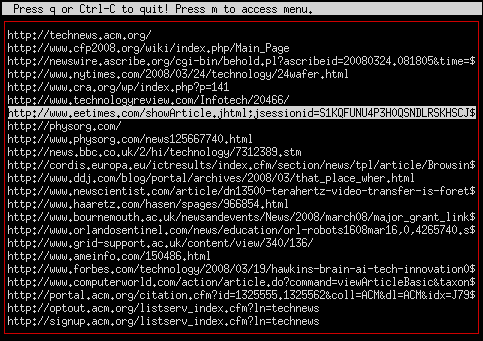
Here's what it looks like for a standard email:
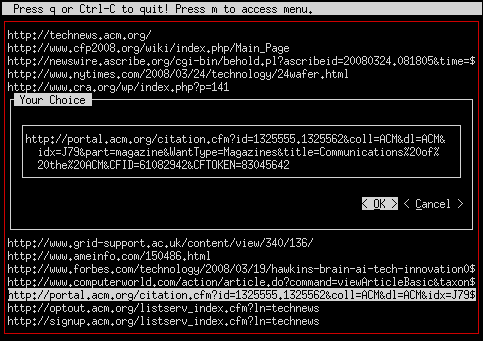
If a URL is too big for your terminal, when you select it,
extract_url.pl will (by default) ask you to review
it in a way that you can see the whole thing. Here's what that
looks like:
Copyright 2011-2013 Kyle Wheeler. All rights reserved.
Redistribution and use in source and binary forms, with or without modification, are permitted provided that the following conditions are met:
THIS SOFTWARE IS PROVIDED BY KYLE WHEELER ``AS IS'' AND ANY EXPRESS OR IMPLIED WARRANTIES, INCLUDING, BUT NOT LIMITED TO, THE IMPLIED WARRANTIES OF MERCHANTABILITY AND FITNESS FOR A PARTICULAR PURPOSE ARE DISCLAIMED. IN NO EVENT SHALL KYLE WHEELER OR CONTRIBUTORS BE LIABLE FOR ANY DIRECT, INDIRECT, INCIDENTAL, SPECIAL, EXEMPLARY, OR CONSEQUENTIAL DAMAGES (INCLUDING, BUT NOT LIMITED TO, PROCUREMENT OF SUBSTITUTE GOODS OR SERVICES; LOSS OF USE, DATA, OR PROFITS; OR BUSINESS INTERRUPTION) HOWEVER CAUSED AND ON ANY THEORY OF LIABILITY, WHETHER IN CONTRACT, STRICT LIABILITY, OR TORT (INCLUDING NEGLIGENCE OR OTHERWISE) ARISING IN ANY WAY OUT OF THE USE OF THIS SOFTWARE, EVEN IF ADVISED OF THE POSSIBILITY OF SUCH DAMAGE.
URI::FindALTSELECT), allowing a person to, in
effect, temporarily negate the PERSISTENT
setting.multipart/alternative parts
don't actually have an alternative, which could fool this
script. Now they're handled correctly (normal text/plain
have 0 parts, according to the MIME parser).